


- Sorry, this product cannot be purchased.
- Sorry, this product cannot be purchased.
“HP 23”Edge To Edge Monitor” has been added to your cart. Continue shopping
“17” Square TFT LCD Monitor” has been added to your cart. Continue shopping
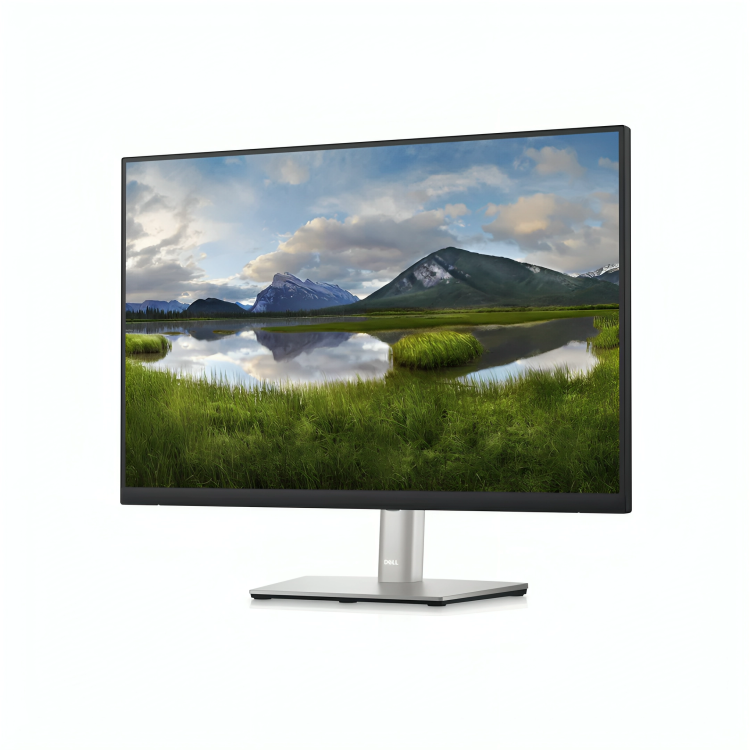
Mouse over to zoom in
Click to open expanded view
- Home
- Shop
- Monitors
- HP Monitors
- DELL 24”Edge To Edge Monitor
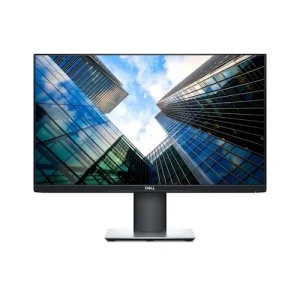
DELL 24”Edge To Edge Monitor
KSh 7,500.00
In stock
- Size: DELL 24-inch screen
- Resolution: Full HD (1920×1080)
- Panel Type: IPS or VA
- Design: Ultra-thin, edge-to-edge bezel
Categories: HP Monitors, Monitors

DELL 24”Edge To Edge Monitor
The HP 24″ Edge-to-Edge Monitor is a sleek, modern display designed to provide high-quality visuals and an immersive viewing experience, perfect for both professional and personal use. The monitor features an edge-to-edge display with a near-borderless design, making it an ideal choice for users who need a space-efficient yet immersive screen for work, entertainment, or gaming.
Here’s a detailed description of the DELL 24″ Edge-to-Edge Monitor:
Key Features and Specifications:
1. Display:
- Size: 24 inches
- The 24-inch size offers a balance between screen real estate and desk space, making it ideal for users who want a larger screen for productivity or multimedia without overwhelming their workspace.
- Resolution: Full HD (1920×1080)
- The Full HD resolution provides crisp and clear visuals with a 16:9 aspect ratio, ensuring vibrant colors, sharp text, and clear images for productivity, browsing, and media consumption.
- Panel Type: IPS (In-Plane Switching) or VA (Vertical Alignment), depending on the model
- IPS technology offers wide viewing angles (up to 178 degrees) and consistent color reproduction, making the monitor ideal for work that requires color accuracy and detailed visuals.
- VA panels (on some models) provide deeper blacks and higher contrast ratios, which is excellent for movie watching or gaming.
- Edge-to-Edge Design:
- The monitor features a borderless, edge-to-edge display, providing an ultra-modern look with minimal bezel, which enhances immersion, especially in multi-monitor setups.
- The near-borderless design maximizes screen space and offers a more expansive view, ideal for productivity, gaming, and multimedia experiences.
2. Visual Quality:
- Brightness: 250-300 nits (depending on model)
- A brightness level of 250-300 nits ensures clear visibility in most indoor environments, making it suitable for both work and casual use, even in moderately bright settings.
- Contrast Ratio: 1000:1 (typical)
- The 1000:1 contrast ratio provides deep blacks and bright whites, helping to enhance the overall picture quality and making images and videos appear more vibrant.
- Color Accuracy: 72% NTSC or 99% sRGB
- The monitor covers a wide color gamut, providing accurate colors, which is essential for tasks like photo editing, content creation, and professional design work.
3. Connectivity:
- Ports:
- HDMI: Offers easy connectivity with modern devices like laptops, PCs, gaming consoles, and streaming devices.
- VGA: Some models come with VGA input for compatibility with older devices, though this is becoming less common in modern monitors.
- DisplayPort (optional): Some variants may include DisplayPort for higher-bandwidth connections, allowing for even faster refresh rates and resolutions.
- Audio Out: An audio-out jack allows for external speakers or headphones to be connected directly to the monitor.
- USB Ports: (on selected models)
- Some models may include USB ports for connecting peripherals like a keyboard, mouse, or external storage devices, allowing the monitor to act as a hub.
4. Performance:
- Response Time: 5ms (typical)
- A 5ms response time is suitable for general tasks such as office work, web browsing, and casual gaming, though it might not be fast enough for competitive gaming.
- Refresh Rate: 60Hz (standard)
- A refresh rate of 60Hz provides smooth visuals for most daily computing tasks and casual gaming. It ensures fluid movement on the screen without flickering.
- Anti-Glare Coating: Yes
- The anti-glare coating reduces reflections and improves screen visibility in bright environments, making it ideal for office settings or home spaces with plenty of natural light.
5. Design and Build:
- Slim Profile and Compact Design:
- The DELL 24″ Edge-to-Edge Monitor is designed to be slim and lightweight, making it a good choice for users who want a modern look without sacrificing desk space.
- The edge-to-edge design provides a sleek, minimalistic appearance with a thin bezel that enhances the overall aesthetic of the monitor.
- Stand and Adjustability:
- The stand is typically tilt-adjustable, allowing you to adjust the viewing angle for comfort.
- Depending on the model, there may be VESA mount compatibility, allowing users to mount the monitor on a wall or an adjustable arm for a cleaner, more ergonomic setup.
- Bezels: Ultra-thin bezels (3-sided edge-to-edge design)
- The ultra-thin bezels give the monitor a modern, clean look and enhance immersion in applications like gaming and media consumption. It also makes the monitor ideal for multi-monitor setups, as the seamless edges reduce distractions between displays.
6. Energy Efficiency:
- ENERGY STAR Certified:
- The monitor is typically ENERGY STAR certified, ensuring that it meets energy efficiency standards, which reduces power consumption and helps lower operating costs.
- Low Power Consumption:
- With features like automatic sleep mode and low power usage, this monitor helps save energy when it’s not in use.
7. Additional Features:
- DELL Eye Ease Technology:
- Some models feature HP Eye Ease, a blue light filtering technology that reduces eye strain during long hours of use. This technology helps to promote a more comfortable viewing experience, especially in low-light conditions or when working for extended periods.
- Adjustable Brightness and Contrast Settings:
- Allows users to manually adjust the brightness and contrast to suit their preferences and the lighting in their environment, improving visibility and comfort.
8. Compatibility:
- PC and Mac Compatible:
- The DELL 24″ Edge-to-Edge Monitor is compatible with both Windows PCs and Macs, making it versatile for a wide range of users.
- Multi-Monitor Setup Support:
- With its slim bezels and edge-to-edge design, this monitor is ideal for creating a multi-monitor setup. The reduced bezel width ensures that the displays align seamlessly for a more immersive workspace.
Ideal Use Cases:
- Office Work:
- Perfect for tasks such as word processing, spreadsheets, web browsing, and video conferencing. The large display area provides ample room for multitasking, increasing productivity.
- Media Consumption:
- Great for watching videos, streaming movies, or enjoying entertainment, as the Full HD resolution and good color accuracy deliver an enjoyable viewing experience.
- Casual Gaming:
- Suitable for casual gaming with a 60Hz refresh rate and 5ms response time. It’s not designed for professional or competitive gaming, but it performs well for most casual gaming needs.
- Content Creation and Design:
- The monitor’s color accuracy and wide viewing angles make it suitable for tasks like photo editing, graphic design, and other creative work where visual precision is important.
- Home Use:
- Its sleek and modern design makes it a good fit for home offices, study areas, or entertainment spaces.
The HP 24″ Edge-to-Edge Monitor is an excellent option for users seeking a high-quality, space-efficient display for work, entertainment, and casual gaming. Its Full HD resolution, slim design, and edge-to-edge display make it ideal for those looking for a modern, minimalistic monitor that delivers good performance and vibrant visuals. Whether you’re working from home, editing content, or enjoying multimedia, this monitor provides the quality and features needed for a range of tasks.
Add your review Cancel reply

Reviews
There are no reviews yet.